

Quality or efficiency. Pick two.

Quality or efficiency. Pick two.

Quality or efficiency. Pick two.

Bezi becomes your studio’s dynamic knowledge base that powers game dev agents across programming, design, and technical art. The team moves faster, the creative standard remains.

Bezi becomes your studio’s dynamic knowledge base that powers game dev agents across programming, design, and technical art. The team moves faster, the creative standard remains.

Bezi
Everest Scale
Home
Settings
Add. Movement
Grapple Vault
Wall Run
Ledge Grab
Combat Systems
World
Characters
TO-DO
Page
Grapple Vault
Description
The Grapple Vault is a momentum-based traversal move that lets the player latch onto anchor points and swing across gaps, converting swing velocity into a launch arcMira. It rewards timing the release at the bottom of the swing for maximum distance. Theo
While an anchor is in reach, the reticle telegraphs the lock before the player commits— Priya. The cue reuses the anchor-glow ring so it reads at a glance.
Visual Characteristics
  • Grapple line— a taut cable renders from the wrist to the anchor, tightening sharply on latch
  • Anchor glow— a pulsing ring highlights the active anchor point while it is in reach
  • Speed lines— radial motion blur ramps in as the launch arc crosses the speed threshold
  • Landing dust— an impact puff and a short camera shake fire on touchdown
  • Trail— a fading arc trail traces the full swing path behind the player
Triggers
  • Anchor in range— reticle snaps to the nearest grapple point within 25m
  • Release window— launch power scales with swing speed at the moment of release
  • Chain grapples— consecutive latches inside the release window preserve momentum
  • COOLDOWN: 0.5s minimum between consecutive grapples
Made in Ask Mode
What visual triggers do we already have to signal a target lock-on?
Restore
Edit
Two existing cues already read as a lock-on: the anchor-glow ring and the grapple reticle — both fire the moment an anchor enters range.
Explored · AnchorHighlight, ReticleController
AnchorHighlight pulses the ring on range-enter; ReticleController swaps to its locked state once the anchor is confirmed, so lock-on is signalled without a new asset.
Bezi
Everest Scale
Home
Settings
Add. Movement
Grapple Vault
Wall Run
Ledge Grab
Combat Systems
World
Characters
TO-DO
Page
Grapple Vault
Description
The Grapple Vault is a momentum-based traversal move that lets the player latch onto anchor points and swing across gaps, converting swing velocity into a launch arcMira. It rewards timing the release at the bottom of the swing for maximum distance. Theo
While an anchor is in reach, the reticle telegraphs the lock before the player commits— Priya. The cue reuses the anchor-glow ring so it reads at a glance.
Visual Characteristics
  • Grapple line— a taut cable renders from the wrist to the anchor, tightening sharply on latch
  • Anchor glow— a pulsing ring highlights the active anchor point while it is in reach
  • Speed lines— radial motion blur ramps in as the launch arc crosses the speed threshold
  • Landing dust— an impact puff and a short camera shake fire on touchdown
  • Trail— a fading arc trail traces the full swing path behind the player
Triggers
  • Anchor in range— reticle snaps to the nearest grapple point within 25m
  • Release window— launch power scales with swing speed at the moment of release
  • Chain grapples— consecutive latches inside the release window preserve momentum
  • COOLDOWN: 0.5s minimum between consecutive grapples
Made in Ask Mode
What visual triggers do we already have to signal a target lock-on?
Restore
Edit
Two existing cues already read as a lock-on: the anchor-glow ring and the grapple reticle — both fire the moment an anchor enters range.
Explored · AnchorHighlight, ReticleController
AnchorHighlight pulses the ring on range-enter; ReticleController swaps to its locked state once the anchor is confirmed, so lock-on is signalled without a new asset.

The whole team builds from a single source of truth

Design docs, standards, and decisions live in one shared foundation that every teammate's Bezi draws from. Output aligns across the team because every agent works from the same dynamic unified memory.

UNITYFileEditAssetsGameObjectComponent
▶|
CloudSearchLayout ▾
GameDisplay 1 ▾Free Aspect ▾
ScaleStatsGizmos ▾
Unity editor showing CityHero with a Bezi navigation mesh conversation
Navigation
Agent Type
Walkable
Area Mask
All
Generate Links
Project
Console
Animation
HierarchyProject
FishingScene
World
NavMesh
Environment
Dock
Boats
Terrain
Obstacles
Navigation
NavMeshSurface
Main Camera
Directional Light
Post Processing
Player
Game Manager
Transform
Navigation Static
Layer Default
Inspector
Assets / Scenes / FishingSceneConsole   0   ⊘ 0
How can I make a static nav mesh from in-scene objects that have collision?. I’ll help you create a static NavMesh from objects with collision in your scene. Let me first examine your current scene structure.. Creating a Static NavMesh from Scene Objects with Collision. I can see from your scene hierarchy that you have a complex fishing game environment with various objects like docks, boats, obstacles, and terrain. Here’s a comprehensive guide to create a static NavMesh from your scene objects that have collision.
UNITYFileEditAssetsGameObjectComponent
▶|
CloudSearchLayout ▾
GameDisplay 1 ▾Free Aspect ▾
ScaleStatsGizmos ▾
Unity editor showing CityHero with a Bezi navigation mesh conversation
Navigation
Agent Type
Walkable
Area Mask
All
Generate Links
Project
Console
Animation
HierarchyProject
FishingScene
World
NavMesh
Environment
Dock
Boats
Terrain
Obstacles
Navigation
NavMeshSurface
Main Camera
Directional Light
Post Processing
Player
Game Manager
Transform
Navigation Static
Layer Default
Inspector
Assets / Scenes / FishingSceneConsole   0   ⊘ 0
How can I make a static nav mesh from in-scene objects that have collision?. I’ll help you create a static NavMesh from objects with collision in your scene. Let me first examine your current scene structure.. Creating a Static NavMesh from Scene Objects with Collision. I can see from your scene hierarchy that you have a complex fishing game environment with various objects like docks, boats, obstacles, and terrain. Here’s a comprehensive guide to create a static NavMesh from your scene objects that have collision.

Epic Games

I’ve always wanted a tool like Bezi to speed up my game dev. Even in its early stages, its Unity know-how is unmatched. Agent mode is like having an intern, but lightning fast! Can’t wait to see Bezi transform Unity development.

Vinícius P.

Epic Games

Epic Games

I’ve always wanted a tool like Bezi to speed up my game dev. Even in its early stages, its Unity know-how is unmatched. Agent mode is like having an intern, but lightning fast! Can’t wait to see Bezi transform Unity development.

Vinícius P.

Epic Games

Progress compounds for everyone as the agent adapts

Progress compounds for everyone as the agent adapts

As individuals solve problems and refine how they build, those learnings feed back in to the shared knowledge base. Bezi grows smarter for the whole team with each win and operates more efficiently.

UI Specs/UI Color System•••
UI Color System
Game UI Color Palette Specification
This document defines the color palette, usage rules, accessibility thresholds, and visual behavior for Astral Adventure. The palette is designed for a sleek sci-fi fantasy interface with high clarity and emotional mood cues.
Palette overview
The palette consists of four tiers of system colors:
• Core Brand Colors – identity colors used across primary UI surfaces.
• Functional Colors – semantic colors for actions, states, and feedback.
• Neutral Colors – structure, text, and elevation.
• Atmospheric Accents – decorative glows and thematic elements.
Core Brand Colors
• Astral Blue (#4DA5FF)
Primary brand color; buttons, highlights, and key actions.
• Void Indigo (#1C1F3A)
Secondary brand color; accents and category labels.
• Nebula Teal (#3DF5D1)
Secondary brand color; accents and informational states.
• Solar Gold (#FFB64C)
Premium currency, legendary loot, and spotlight moments.
Rules
• Astral Blue is used for primary CTAs and hover states.
• Solar Gold must only be used at <5% of any screen to preserve impact.
• Nebula Teal is reserved for informational UI, not action-driven UI.
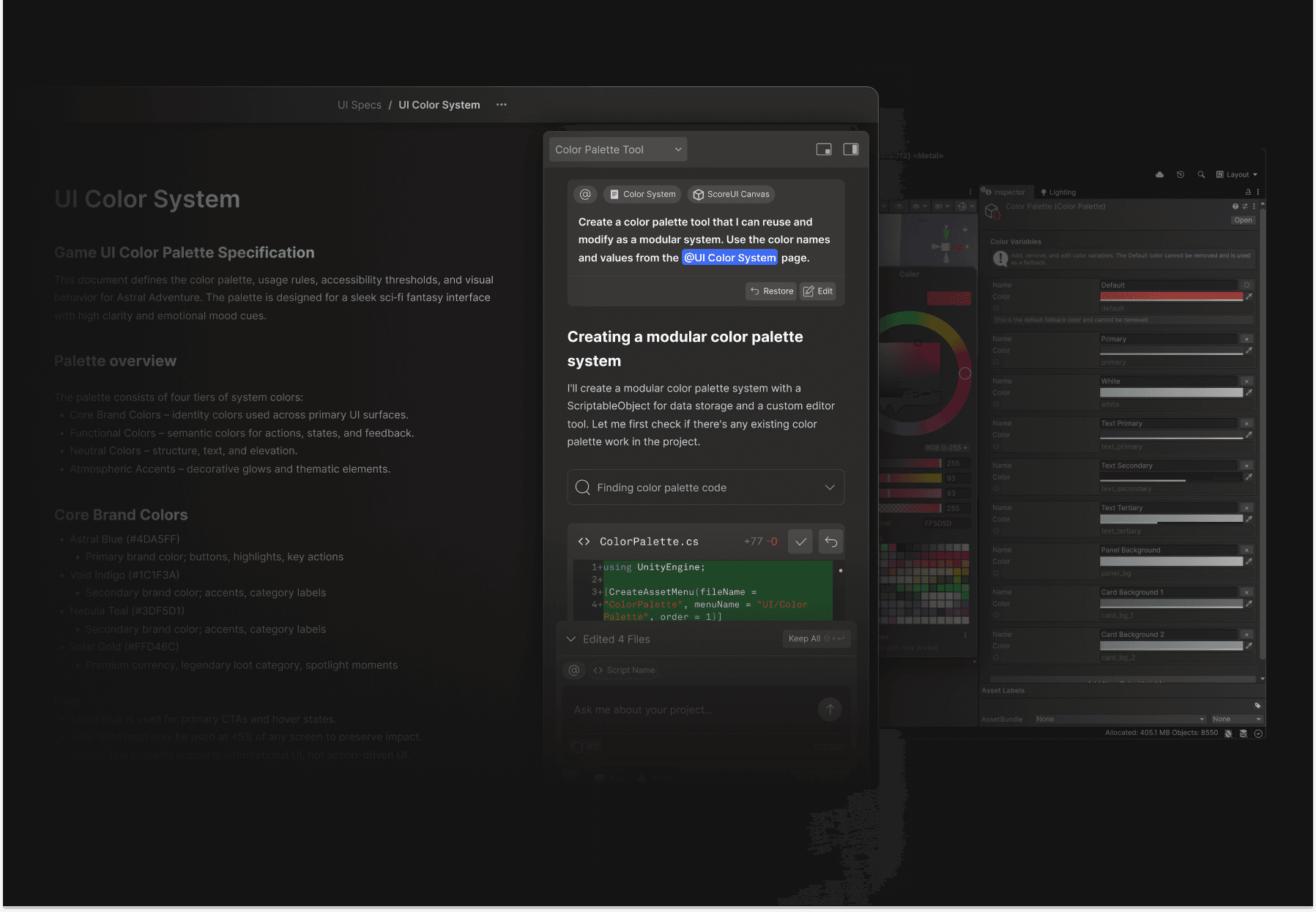
Original Unity Color Palette inspector, color picker, variable fields and swatches
Color Palette Tool
Made in Agent Mode
Create a color palette tool that I can reuse and modify as a modular system. Use the color names and values from the @UI Color System page.
RestoreEdit
Creating a modular color palette system
I’ll create a modular color palette system with a ScriptableObject for data storage and a custom editor tool. Let me first check if there’s any existing color palette work in the project.
Finding color palette code
ColorPalette.cs+77 -0
1+ using UnityEngine;
2+
3+ [CreateAssetMenu(fileName =
4+ “ColorPalette”, menuName = “UI/Color
5+ Palette”, order = 1)]
Edited 4 FilesKeep All
# ScoreUI@
Color System
/ for skills, @ for context, # for projects
AgentClaude Sonnet 5 Medium
UI Specs/UI Color System•••
UI Color System
Game UI Color Palette Specification
This document defines the color palette, usage rules, accessibility thresholds, and visual behavior for Astral Adventure. The palette is designed for a sleek sci-fi fantasy interface with high clarity and emotional mood cues.
Palette overview
The palette consists of four tiers of system colors:
• Core Brand Colors – identity colors used across primary UI surfaces.
• Functional Colors – semantic colors for actions, states, and feedback.
• Neutral Colors – structure, text, and elevation.
• Atmospheric Accents – decorative glows and thematic elements.
Core Brand Colors
• Astral Blue (#4DA5FF)
Primary brand color; buttons, highlights, and key actions.
• Void Indigo (#1C1F3A)
Secondary brand color; accents and category labels.
• Nebula Teal (#3DF5D1)
Secondary brand color; accents and informational states.
• Solar Gold (#FFB64C)
Premium currency, legendary loot, and spotlight moments.
Rules
• Astral Blue is used for primary CTAs and hover states.
• Solar Gold must only be used at <5% of any screen to preserve impact.
• Nebula Teal is reserved for informational UI, not action-driven UI.
Original Unity Color Palette inspector, color picker, variable fields and swatches
Color Palette Tool
Made in Agent Mode
Create a color palette tool that I can reuse and modify as a modular system. Use the color names and values from the @UI Color System page.
RestoreEdit
Creating a modular color palette system
I’ll create a modular color palette system with a ScriptableObject for data storage and a custom editor tool. Let me first check if there’s any existing color palette work in the project.
Finding color palette code
ColorPalette.cs+77 -0
1+ using UnityEngine;
2+
3+ [CreateAssetMenu(fileName =
4+ “ColorPalette”, menuName = “UI/Color
5+ Palette”, order = 1)]
Edited 4 FilesKeep All
# ScoreUI@
Color System
/ for skills, @ for context, # for projects
AgentClaude Sonnet 5 Medium

Less time documenting, more time building

Less time documenting, more time building

Bezi captures decisions, standards, and outcomes as the work happens, so nobody is pulled off of development. Documentation becomes what the team builds with instead of around.

UNITYFileEditAssetsGameObjectComponent
Purple bioluminescent Unity game environment
GameDisplay 1Free Aspect
Timeline00:06:42
Camera Shake
Player
Ball
Effects
voodoo
Camera Systems/CameraShake Documentation•••
Camera Shakes Documentation

CameraShake Documentation

Overview
ScriptCameraShake.csLocation/Assets/Scripts/CameraShake.csTypeCamera Effect / Game Feel Enhancement
Purpose
Provides dynamic camera shake feedback to enhance impact feel and visual intensity during gameplay. The shake intensity scales with ball speed, making high-speed rallies feel more dramatic and intense—perfectly matching the Gravity Court’s atmosphere.
Features
— Speed-responsive shake— Paddle hits scale with ball velocity— Wall impacts create subtle feedback— Goal scoring triggers a dramatic camera shake— Automatic intensity reduction for a smooth return to normal
Configurable Parameters
• Shake Reduction Speed: How quickly shake dissipates (default: 2.0)• Max Shake Intensity: Upper limit to prevent excessive shake (default: 1.0)• Paddle Hit Multiplier: Shake strength from paddle impacts (default: 0.05)• Wall Hit Multiplier: Shake strength from wall impacts (default: 0.02)• Goal Scored Intensity: Fixed shake for scoring (default: 0.8)• Ball Speed Range: Min/max speeds for scaling (10–28 units/s)
Never compromise IP

SOC 2 Type II certified, verified through independent audit
SOC 2 Type II certified
TLS encription for all data in transit
TLS encryption in transit
Indexed project data stays private to your account and is never shared externally
Project data stays private
AES-256 encryption for all stored files
AES-256 encrypted storage
Your code, assets, and project data are never used to train AI models
Never used to train AI

In practice

CASE STUDY / LOST ARCADE

See how the Lost Arcade team 2X'd its engineering output and slashed dev time by 95%.

Ready to bring Bezi to your studio?

Talk to our team about how Bezi fits your workflow, your team, and your next title.

Send yourself a link and continue on your computer.

USED ONLY FOR YOUR DOWNLOAD LINK.