
Product
Introducing Workspaces: Bezi's new layer of knowledge and collaboration
Introducing Workspaces: Bezi's new layer of knowledge and collaboration
Introducing Workspaces: Bezi's new layer of knowledge and collaboration
Cecilia Uhr
Chief Product Officer

For a long time, Bezi saw your projects as silos. Naming conventions, data structures, architecture decisions, staple mechanics - since none of it could cross project boundaries, you had to serve as the bridge yourself. The result? Hours spent re-teaching Bezi, building systems and workflows you’ve remade a million times already, and creating workarounds like markdown files to carry information between codebases.
That disconnect has been one of the most consistent pieces of feedback we’ve heard. And it is the one that bothered us most. Bezi understands how you work - that knowledge should persist and inform, not disappear.
Today, we're launching Workspaces.
Workspaces introduces an organizational layer above individual Unity projects. You group related Unity projects, local folders, and Pages together under a single Workspace - and all of it becomes persistent knowledge that Bezi draws from, across everything you're building. Bezi can read and write across your full Workspace, so you can iterate on every layer of your game in parallel, regardless of where it is housed. Teams can create shared Pages that every member's Bezi references, with version history for async collaboration.
This is the beginning of Bezi operating across all layers of building a game: multiple projects, multiple people, one persistent memory.
What's New
Workspaces is not a singular feature. It is a structural change to how Bezi organizes your projects, your knowledge, and your AI context.
Connect Multiple Unity Projects
Bezi used to only understand one project at a time. With Workspaces, it can understand all of them at once.
By connecting multiple Unity projects to a single Workspace, you give Bezi persistent knowledge: it remembers your coding conventions, data structures, and system architectures, regardless of which project you’re working on.
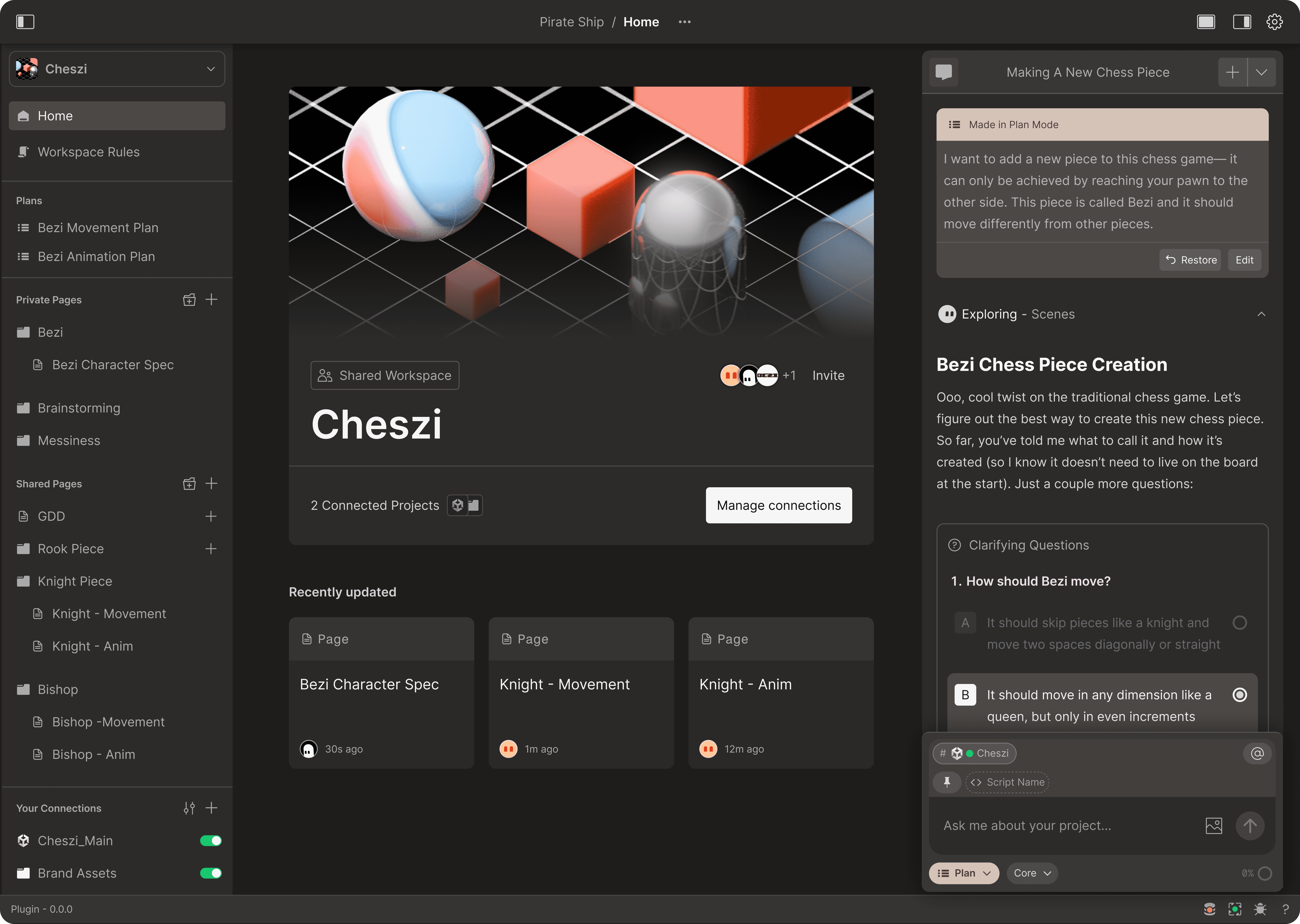
This makes porting a feature from one project to another, refactoring an older game to use the latest engine version, or maintaining a reference project of pre-built systems to pull into new games, clean and consistent.
Take, for example, a team that is maintaining a main production project alongside a separate "content kitchen" where designers iterate on quests can connect both to the same Workspace. The designer working in the content kitchen and the programmer working in the main build are drawing from the same architecture docs, the same foundational systems, and the same coding conventions, because that information exists at the shared Workspace level and informs Bezi, regardless of which project is active.
Connect Local Folders
Bezi has always brought deep understanding to everything inside Unity. Now it brings that same depth to the files that live outside it.
Server-side code, build tooling, design documents, concept art - all of this informs your game, but until now, Bezi couldn't see any of it. You can now connect any local folder on your machine to a Workspace, and Bezi will index its contents alongside your Unity projects, as full context it can read from and write to.
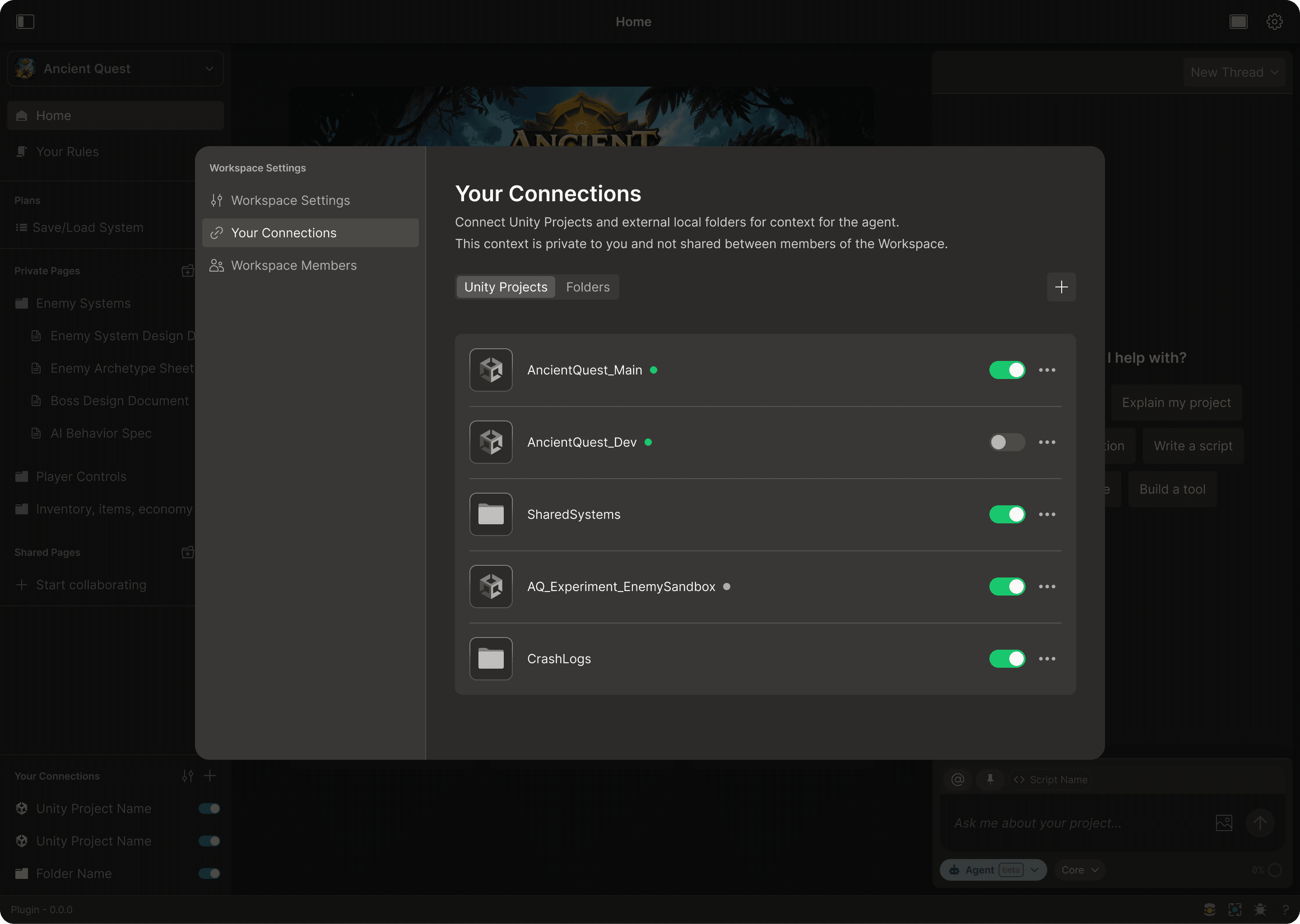
For example, let’s look at multiplayer games. The Unity client lives in the engine, but the game server is oftentimes a separate Node.js or Go project Connecting the server folder to the Workspace means Bezi can read both codebases at once. When a programmer is building client-side features that depend on server data structures, Bezi already understands what is available on the server and how the two communicate. And because Bezi can write to local folders, it can update server-side code alongside the Unity client when a change spans both.
Art teams benefit from this as well. An art bible or a folder of Photoshop source files can be connected to give Bezi visual and design context it would not have from the Unity project alone. A technical artist asking Bezi to create material variants can point it at the style guide in a connected folder and get results in Unity that align with the documented art direction rather than generic defaults.
Parallel Threads
Execution no longer blocks exploration, and you can think while Bezi works.
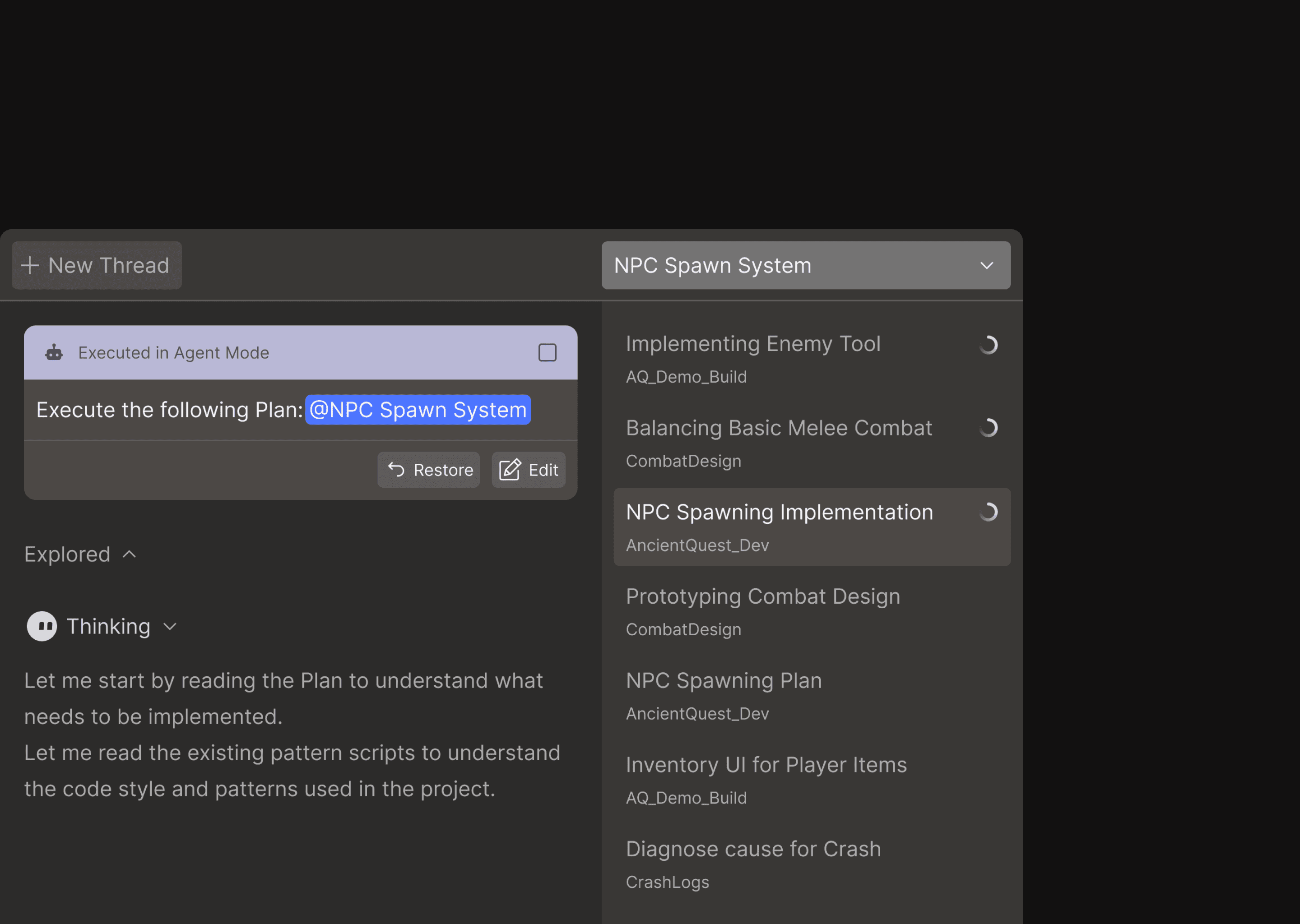
Bezi can now run multiple threads simultaneously within a Workspace. For the stability of your project, only one thread can be in Agent Mode at a time; while Bezi executes changes in your active project, you can create simultaneously threads to debug, ideate, and strategize other systems in Ask and Plan.
This workflow allows you to keep your train-of-thought moving while Bezi handles assembly in the background. Submit an Agent Mode prompt to execute a plan, create scripts, and configure components, then switch to a new thread to do research for another mechanic and plan out its implementation. By the time Bezi’s finished its changes, you’ve got the next task thought out and ready to go.
Active Project and Context Management
Within a Workspace, you control exactly what Bezi can use as context and where it can make changes.
In a thread, one folder is “active” at a time. This is the sole Unity project or folder that Bezi can write to throughout that conversation. All other connected projects provide read-only context. This is a deliberate safety measure: Bezi always knows which project to operate in, so you never risk unwanted script changes and actions in unexpected places.
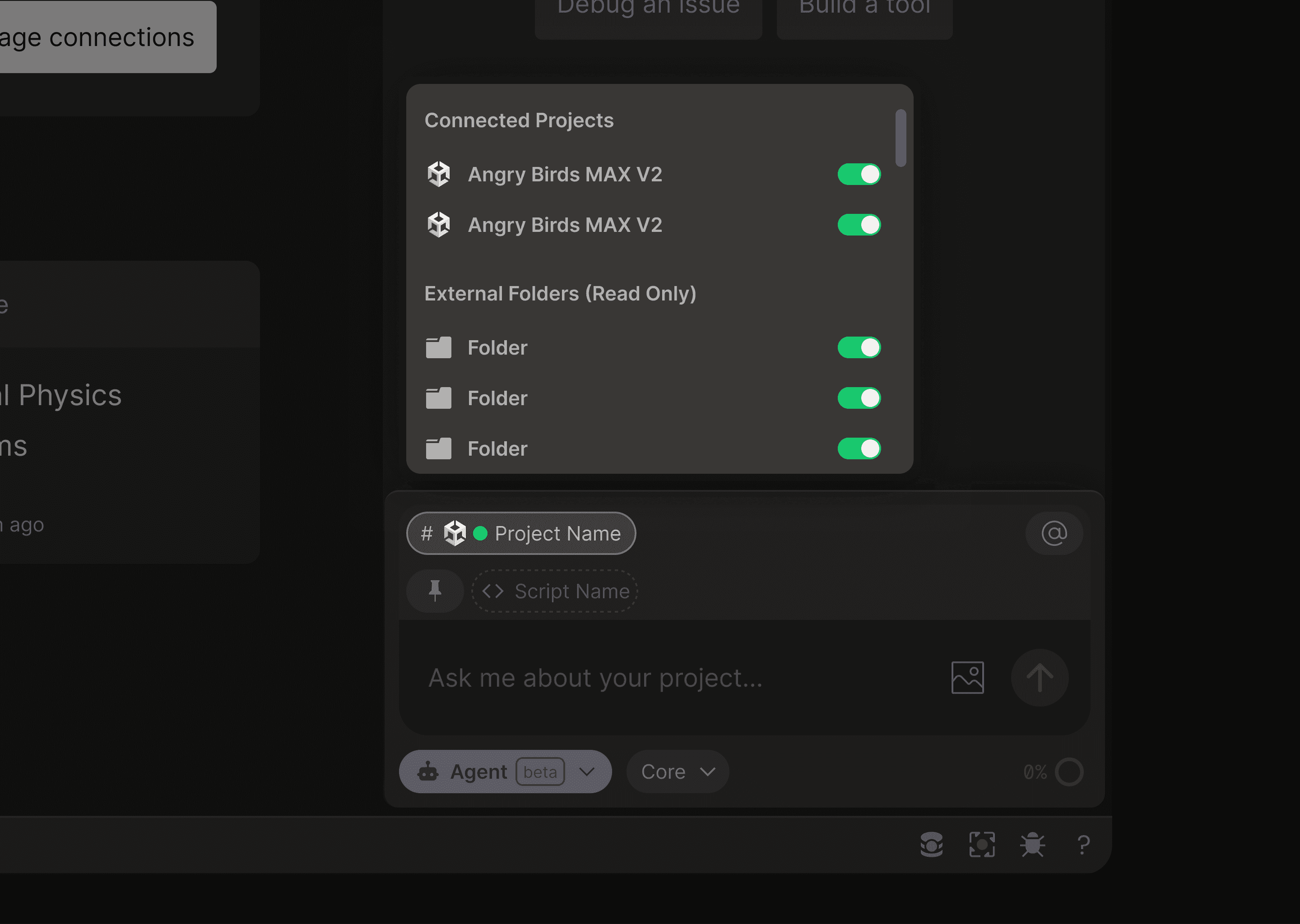
Beyond the active project, you control which connected projects Bezi reads as additional context. Working on a feature that calls into a shared utility library? Toggle it on. Focused on a self-contained task? Narrow the context down to a single project. This granularity lets you direct Bezi's attention to only what is relevant and protect against drops in response quality due to context overload.
Switching the active project requires starting a new thread. When you switch, Bezi gains write access to the newly active project while retaining read access to the other context sources you have enabled.
Shared and Private Pages
Pages in a Workspace can be shared or private. Shared Pages are visible to every member of the Workspace as AI context for everyone. Private Pages are visible only to you.
You document your game’s coding standards, ScriptableObject schemas, architecture decisions, and pipeline specs in shared Pages. Everyone in your Workspace draws information from those Pages when generating code, setting up components, or answering questions with Bezi. The designer asking Bezi to create a quest ScriptableObject and the programmer building the save system both get outputs that conform to the same documented milestone schema, because both of their Bezi instances reference the same shared Page.
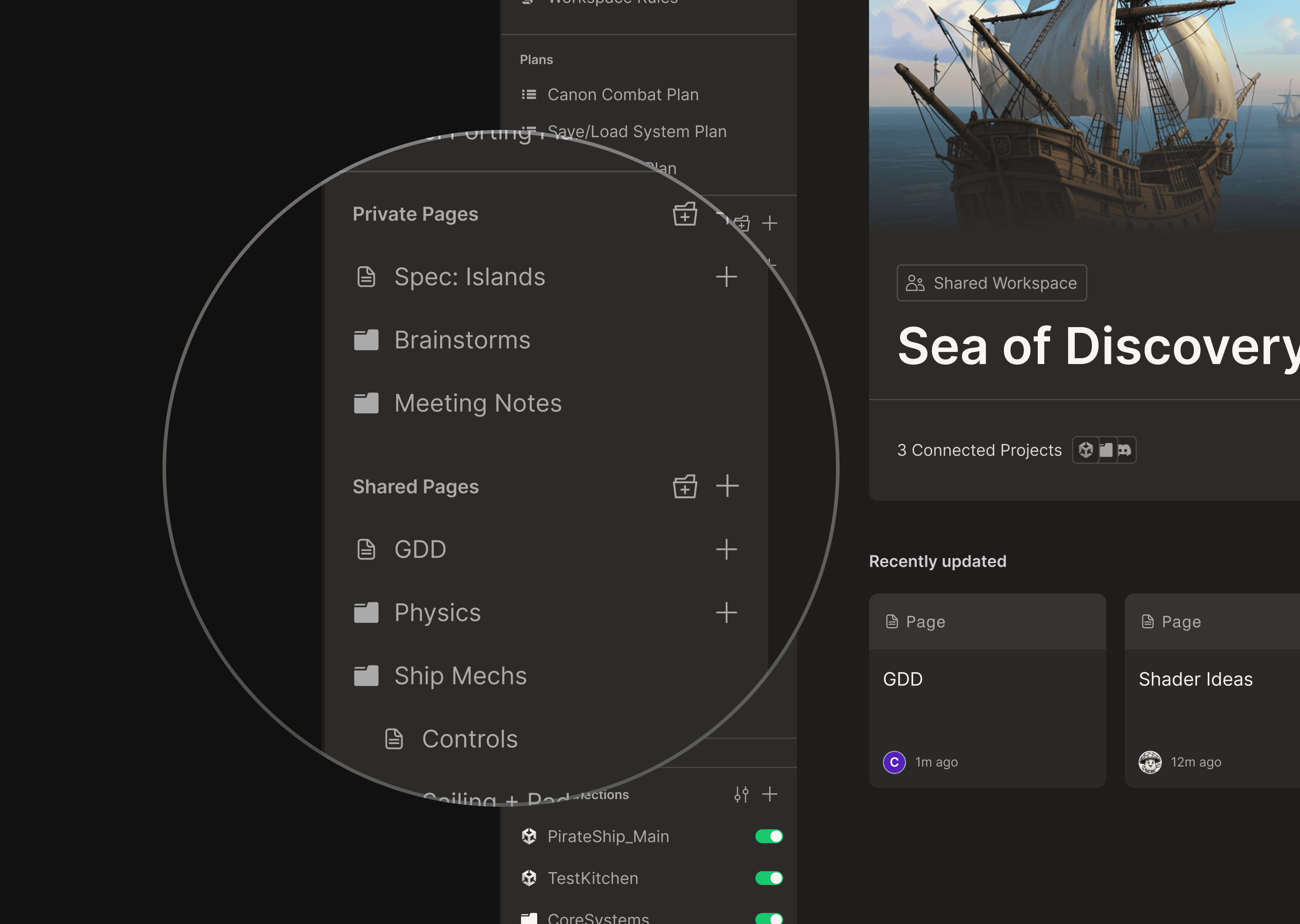
Private Pages remain useful for personal working notes, scratch plans, or context that is specific to your own workflow and not relevant to the broader team. Similarly, user-level Rules remain private to individuals, to allow for tailored response based on respective skills and needs.
You can convert Pages between shared and private at any time.
What's Next
Workspaces is the structural layer everything else builds on: persistent knowledge that spans projects and people, with precise control over what Bezi can read and write.
MCP support is next. MCPs, or Model Context Protocol integrations, will let you connect external tools directly into Bezi: your Jira board, your Notion workspace, your Git repos, your design files. The same way local folders give Bezi context from outside Unity, MCPs will give it context from your entire toolchain.
For a long time, Bezi saw your projects as silos. Naming conventions, data structures, architecture decisions, staple mechanics - since none of it could cross project boundaries, you had to serve as the bridge yourself. The result? Hours spent re-teaching Bezi, building systems and workflows you’ve remade a million times already, and creating workarounds like markdown files to carry information between codebases.
That disconnect has been one of the most consistent pieces of feedback we’ve heard. And it is the one that bothered us most. Bezi understands how you work - that knowledge should persist and inform, not disappear.
Today, we're launching Workspaces.
Workspaces introduces an organizational layer above individual Unity projects. You group related Unity projects, local folders, and Pages together under a single Workspace - and all of it becomes persistent knowledge that Bezi draws from, across everything you're building. Bezi can read and write across your full Workspace, so you can iterate on every layer of your game in parallel, regardless of where it is housed. Teams can create shared Pages that every member's Bezi references, with version history for async collaboration.
This is the beginning of Bezi operating across all layers of building a game: multiple projects, multiple people, one persistent memory.
What's New
Workspaces is not a singular feature. It is a structural change to how Bezi organizes your projects, your knowledge, and your AI context.
Connect Multiple Unity Projects
Bezi used to only understand one project at a time. With Workspaces, it can understand all of them at once.
By connecting multiple Unity projects to a single Workspace, you give Bezi persistent knowledge: it remembers your coding conventions, data structures, and system architectures, regardless of which project you’re working on.
This makes porting a feature from one project to another, refactoring an older game to use the latest engine version, or maintaining a reference project of pre-built systems to pull into new games, clean and consistent.
Take, for example, a team that is maintaining a main production project alongside a separate "content kitchen" where designers iterate on quests can connect both to the same Workspace. The designer working in the content kitchen and the programmer working in the main build are drawing from the same architecture docs, the same foundational systems, and the same coding conventions, because that information exists at the shared Workspace level and informs Bezi, regardless of which project is active.
Connect Local Folders
Bezi has always brought deep understanding to everything inside Unity. Now it brings that same depth to the files that live outside it.
Server-side code, build tooling, design documents, concept art - all of this informs your game, but until now, Bezi couldn't see any of it. You can now connect any local folder on your machine to a Workspace, and Bezi will index its contents alongside your Unity projects, as full context it can read from and write to.
For example, let’s look at multiplayer games. The Unity client lives in the engine, but the game server is oftentimes a separate Node.js or Go project Connecting the server folder to the Workspace means Bezi can read both codebases at once. When a programmer is building client-side features that depend on server data structures, Bezi already understands what is available on the server and how the two communicate. And because Bezi can write to local folders, it can update server-side code alongside the Unity client when a change spans both.
Art teams benefit from this as well. An art bible or a folder of Photoshop source files can be connected to give Bezi visual and design context it would not have from the Unity project alone. A technical artist asking Bezi to create material variants can point it at the style guide in a connected folder and get results in Unity that align with the documented art direction rather than generic defaults.
Parallel Threads
Execution no longer blocks exploration, and you can think while Bezi works.
Bezi can now run multiple threads simultaneously within a Workspace. For the stability of your project, only one thread can be in Agent Mode at a time; while Bezi executes changes in your active project, you can create simultaneously threads to debug, ideate, and strategize other systems in Ask and Plan.
This workflow allows you to keep your train-of-thought moving while Bezi handles assembly in the background. Submit an Agent Mode prompt to execute a plan, create scripts, and configure components, then switch to a new thread to do research for another mechanic and plan out its implementation. By the time Bezi’s finished its changes, you’ve got the next task thought out and ready to go.
Active Project and Context Management
Within a Workspace, you control exactly what Bezi can use as context and where it can make changes.
In a thread, one folder is “active” at a time. This is the sole Unity project or folder that Bezi can write to throughout that conversation. All other connected projects provide read-only context. This is a deliberate safety measure: Bezi always knows which project to operate in, so you never risk unwanted script changes and actions in unexpected places.
Beyond the active project, you control which connected projects Bezi reads as additional context. Working on a feature that calls into a shared utility library? Toggle it on. Focused on a self-contained task? Narrow the context down to a single project. This granularity lets you direct Bezi's attention to only what is relevant and protect against drops in response quality due to context overload.
Switching the active project requires starting a new thread. When you switch, Bezi gains write access to the newly active project while retaining read access to the other context sources you have enabled.
Shared and Private Pages
Pages in a Workspace can be shared or private. Shared Pages are visible to every member of the Workspace as AI context for everyone. Private Pages are visible only to you.
You document your game’s coding standards, ScriptableObject schemas, architecture decisions, and pipeline specs in shared Pages. Everyone in your Workspace draws information from those Pages when generating code, setting up components, or answering questions with Bezi. The designer asking Bezi to create a quest ScriptableObject and the programmer building the save system both get outputs that conform to the same documented milestone schema, because both of their Bezi instances reference the same shared Page.
Private Pages remain useful for personal working notes, scratch plans, or context that is specific to your own workflow and not relevant to the broader team. Similarly, user-level Rules remain private to individuals, to allow for tailored response based on respective skills and needs.
You can convert Pages between shared and private at any time.
What's Next
Workspaces is the structural layer everything else builds on: persistent knowledge that spans projects and people, with precise control over what Bezi can read and write.
MCP support is next. MCPs, or Model Context Protocol integrations, will let you connect external tools directly into Bezi: your Jira board, your Notion workspace, your Git repos, your design files. The same way local folders give Bezi context from outside Unity, MCPs will give it context from your entire toolchain.
Haikus by Bezi
What are workspaces?
A new way to context-maxx
We swear, this is good.
Join thousands of developers, artists, and designers using Bezi to build their games


Send yourself a link and continue on your computer.
USED ONLY FOR YOUR DOWNLOAD LINK.