
Product
Introducing Model Selection & A New Credit System
Introducing Model Selection & A New Credit System
Introducing Model Selection & A New Credit System
Julian Park
CEO

Starting today, you have more control over how Bezi thinks, access to AI capabilities that weren’t available before, and threads that run without pauses. A new model picker allows you to select the best workflow for your task:
Frontier for complex, multi-step challenges that were previously out of reach
Core for balanced reasoning and everyday tasks
Basic for fast, lightweight work
We’re also introducing Auto-Continue and removing the 20 tool-call limit. This means Bezi can now run multi-step tasks from start to finish without interruption, so you can stay in the flow.
To enable this enhanced flexibility, we have updated our credit system.
Read on for everything that's new.
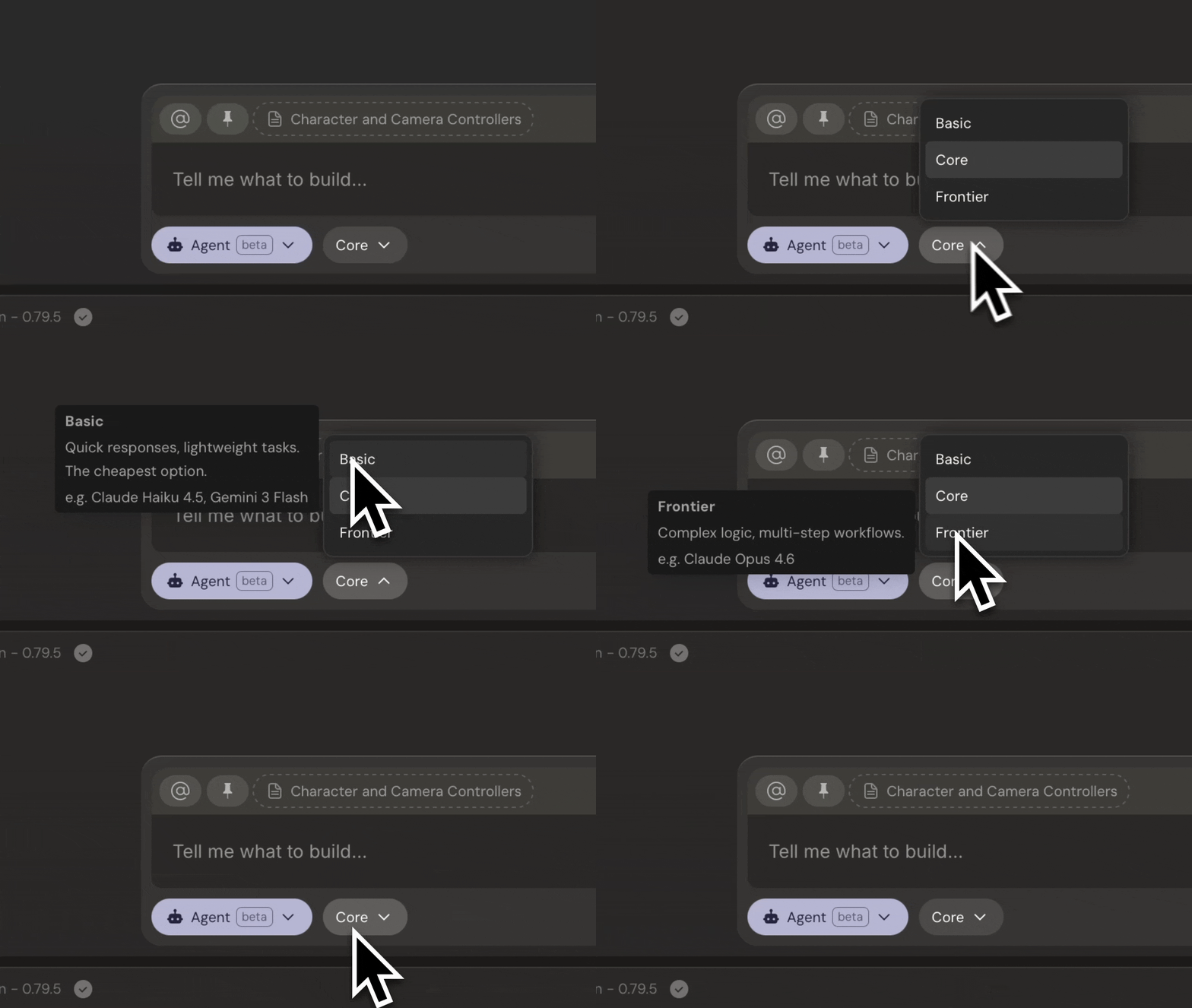
Model Options: Frontier, Core, and Basic
Every prompt in Bezi now has a model selector. Here's what each option means in practice.
Frontier
Frontier brings in the most capable models available, like Claude Opus 4.6, and presents the biggest expansion of Bezi’s capabilities yet. It is built for tasks where depth of reasoning matters: complex multi-file refactors, architectural decisions with downstream implications, deep debugging across scenes and systems where the root cause isn't obvious. We recommend reserving Frontier usage to your heaviest and most complicated asks, as it will consume the most credits.
Core
Core is the default mode and runs on models like Claude Sonnet 4.6, good for anything that requires moderate reasoning. It handles the full range of game development work, at mid-range complexity. It's best for writing a mechanic from scratch, debugging a multi-script issue, generating a standard shader, or building an editor tool.
Basic
Basic runs on lightweight models like Gemini 3 Flash, built for speed and fast turnaround. It's best for simple asks and small tweaks, like finding dependencies, making minor adjustments to existing systems, or walking you through a new package.
All models are available on all plans.
Auto-Continue and Ending the Tool-Call Limit
With Auto-Continue, Bezi can complete multi-step tasks without any human intervention. This has replaced the 20 tool-call limit per prompt. With Auto-Continue, a prompt that previously would have required a manual “continue” mid-task now runs the full sequence until the task is complete.
The New Credit System
To enable the auto-continue workflow and per-prompt model selection, we are updating the credit model. The old 1 prompt = 1 credit model was simple, but could not support multi-model or multi-step work.
In the new system, credit consumption is dictated by the model you choose:
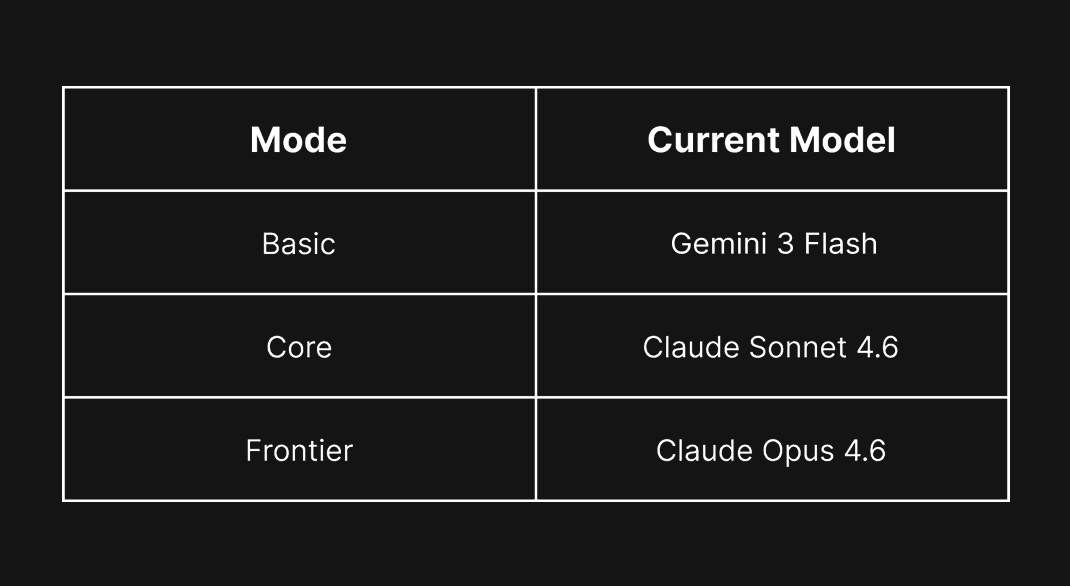
With this, we're also increasing the credit pool per month on every plan:
Pro Plans increase from 500 to 800 credits
Advanced Plans increase from 1,800 to 2,400 credits
Team Plans increase from 5,000 to 8,000 shared credits
Free Trials increase from 50 to 100 credits
Your subscription price is not changing with this update. Our goal is to give more room to explore and fit Bezi to how you like to work. All users will have their credit limits updated to the new amounts, effective immediately for the current cycle. Your usage so far this month will not change, only the limit goes up. For example: if you are on the Pro plan and have used 200 credits out of your old limit of 500, your new limit becomes 800. That leaves you with 600 credits for the rest of the month.
If you need more credits mid-month, you can enable on-demand credits in Usage & Subscriptions. On-demand credits are now priced at $0.05 per credit (down from the old price of $0.20 per credit).
New Controls for Peace of Mind
More flexibility can introduce risk of unexpected usage. To help you maintain control, we built tools to monitor credit consumption.
Usage Dashboard
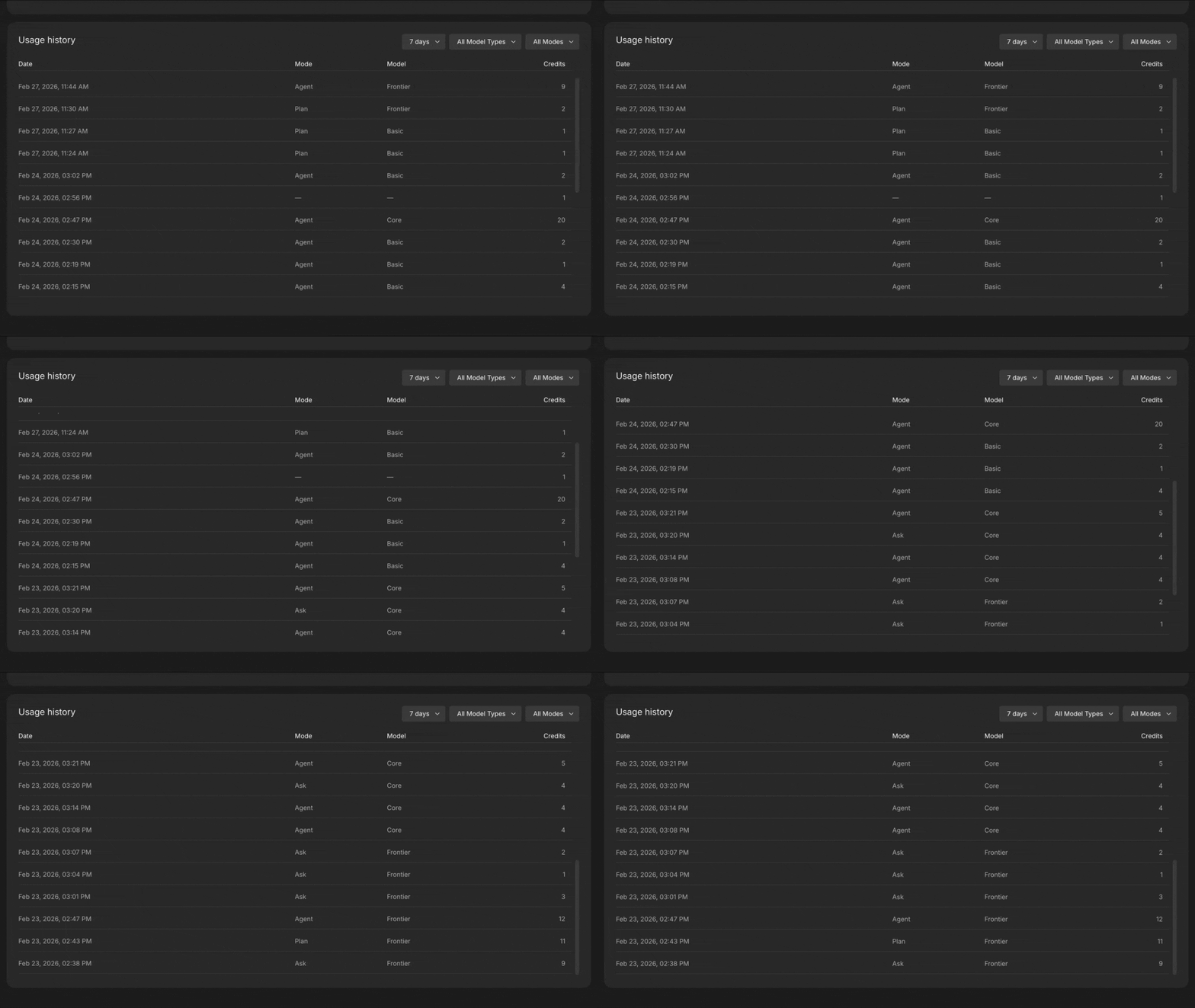
The Usage tab in your Account Dashboard now includes a full usage history view: credits consumed per prompt, breakdowns by model and mode, and historical trends. No more guessing where your credits were used.
Spend Limits
You can set monthly spend limits for extra credits beyond the credits provided in the subscription. This can be enabled in your Account Dashboard, or in-app when you reach your current limit.
Migration: What Happens to Your Existing Credits
All users will have their credit limits updated to the new amounts, effective immediately for the current cycle. Your usage so far this month will not change, only the limit goes up. For example: if you are on the Pro plan and have used 200 credits out of your old limit of 500, your new limit becomes 800. That leaves you with 600 credits for the rest of the month.
Model Selector is live for all users today. Have questions about how credits work or what to expect? Join the conversation in Discord.
Starting today, you have more control over how Bezi thinks, access to AI capabilities that weren’t available before, and threads that run without pauses. A new model picker allows you to select the best workflow for your task:
Frontier for complex, multi-step challenges that were previously out of reach
Core for balanced reasoning and everyday tasks
Basic for fast, lightweight work
We’re also introducing Auto-Continue and removing the 20 tool-call limit. This means Bezi can now run multi-step tasks from start to finish without interruption, so you can stay in the flow.
To enable this enhanced flexibility, we have updated our credit system.
Read on for everything that's new.
Model Options: Frontier, Core, and Basic
Every prompt in Bezi now has a model selector. Here's what each option means in practice.
Frontier
Frontier brings in the most capable models available, like Claude Opus 4.6, and presents the biggest expansion of Bezi’s capabilities yet. It is built for tasks where depth of reasoning matters: complex multi-file refactors, architectural decisions with downstream implications, deep debugging across scenes and systems where the root cause isn't obvious. We recommend reserving Frontier usage to your heaviest and most complicated asks, as it will consume the most credits.
Core
Core is the default mode and runs on models like Claude Sonnet 4.6, good for anything that requires moderate reasoning. It handles the full range of game development work, at mid-range complexity. It's best for writing a mechanic from scratch, debugging a multi-script issue, generating a standard shader, or building an editor tool.
Basic
Basic runs on lightweight models like Gemini 3 Flash, built for speed and fast turnaround. It's best for simple asks and small tweaks, like finding dependencies, making minor adjustments to existing systems, or walking you through a new package.
All models are available on all plans.
Auto-Continue and Ending the Tool-Call Limit
With Auto-Continue, Bezi can complete multi-step tasks without any human intervention. This has replaced the 20 tool-call limit per prompt. With Auto-Continue, a prompt that previously would have required a manual “continue” mid-task now runs the full sequence until the task is complete.
The New Credit System
To enable the auto-continue workflow and per-prompt model selection, we are updating the credit model. The old 1 prompt = 1 credit model was simple, but could not support multi-model or multi-step work.
In the new system, credit consumption is dictated by the model you choose:
With this, we're also increasing the credit pool per month on every plan:
Pro Plans increase from 500 to 800 credits
Advanced Plans increase from 1,800 to 2,400 credits
Team Plans increase from 5,000 to 8,000 shared credits
Free Trials increase from 50 to 100 credits
Your subscription price is not changing with this update. Our goal is to give more room to explore and fit Bezi to how you like to work. All users will have their credit limits updated to the new amounts, effective immediately for the current cycle. Your usage so far this month will not change, only the limit goes up. For example: if you are on the Pro plan and have used 200 credits out of your old limit of 500, your new limit becomes 800. That leaves you with 600 credits for the rest of the month.
If you need more credits mid-month, you can enable on-demand credits in Usage & Subscriptions. On-demand credits are now priced at $0.05 per credit (down from the old price of $0.20 per credit).
New Controls for Peace of Mind
More flexibility can introduce risk of unexpected usage. To help you maintain control, we built tools to monitor credit consumption.
Usage Dashboard
The Usage tab in your Account Dashboard now includes a full usage history view: credits consumed per prompt, breakdowns by model and mode, and historical trends. No more guessing where your credits were used.
Spend Limits
You can set monthly spend limits for extra credits beyond the credits provided in the subscription. This can be enabled in your Account Dashboard, or in-app when you reach your current limit.
Migration: What Happens to Your Existing Credits
All users will have their credit limits updated to the new amounts, effective immediately for the current cycle. Your usage so far this month will not change, only the limit goes up. For example: if you are on the Pro plan and have used 200 credits out of your old limit of 500, your new limit becomes 800. That leaves you with 600 credits for the rest of the month.
Model Selector is live for all users today. Have questions about how credits work or what to expect? Join the conversation in Discord.
Haikus by Bezi
Basic, Core, and Frontier
A model for every task
Choose wisely, gamers
Join thousands of developers, artists, and designers using Bezi to build their games


Send yourself a link and continue on your computer.
USED ONLY FOR YOUR DOWNLOAD LINK.